Profit and Loss Statement Template: A No-Fluff Guide With a Worked Month
Profit and loss statement template: the lines it needs, a worked month built from 33 sample entries, and which tax column to read so profit isn't overstated.
By Easy Bookkeeping Sheet by Cosmo Suite · Editorial policy
Published · 9 min read
Can a profit and loss statement (P&L) really come from two columns in a spreadsheet, money in and money out? It comes up on tax forums, usually when a lender, a landlord or a tax return asks for a P&L from someone who has never made one.
The short answer: yes. A profit and loss statement template needs five lines: revenue, direct costs, gross profit, expenses by category and net profit. The hard part is the log that feeds it: every sale and cost needs a date, a category and its tax. If you are tired of copying totals into a blank form, a bookkeeping spreadsheet that builds the P&L from your entries removes that step.
Below: the options, a sample month turned into a P&L, the tax-column mistake that overstates profit, and what a P&L never shows.
Profit and Loss Statement Templates at a Glance
A profit and loss statement template is a layout that turns a period's income and expenses into one profit figure. The options differ mainly in where the numbers come from.
| Option | Where the numbers come from | What it misses | Best for |
|---|---|---|---|
| Blank PDF or Word form | You add up each line and type the totals | Any check that the totals match your records | A one-off P&L for a lender, built from finished books |
| Free one-tab spreadsheet | Totals you type in, sums done by formula | A log of entries, a tax column, a year view | A few transactions a month |
| Online P&L generator | Figures you key in once | Saving the month, comparing months | A quick estimate |
| Linked bookkeeping workbook | Your logged entries, summed by category and month | Bank feeds, invoicing | Sole owners with a few dozen lines a month |
| Accounting software | Bank feeds and categorised transactions | Nothing for simple books, at a monthly price | Payroll, stock, several users |
You complete the first three by hand. The last two calculate themselves from a log of entries, so they cannot drift away from your records.
What goes on a profit and loss statement?
A profit and loss statement is a summary of one period's revenue, direct costs, gross profit, operating expenses by category, and net profit. business.gov.au puts it plainly: a P&L "lists your sales and expenses. It tells you how much profit you're making, or how much you're losing," and you usually complete one "every month, quarter or year" (business.gov.au).
Each line, for a small business:
- Period. The month, quarter or year covered.
- Revenue. What customers paid you for goods or services, less any refunds you gave.
- Direct costs. What it cost to make or buy what you sold, such as stock and packaging. A freelancer often has none.
- Gross profit. What each sale leaves before overheads are paid.
- Operating expenses and net profit. Everything else (ads, software, fees, phone) by category, then gross profit minus those.
Gross profit is revenue minus direct costs, and net profit is what remains after every expense. If you sell a service, skip lines 3 and 4 and write a single-step P&L: income minus expenses. Both versions end on the same net profit.
Can you build a P&L from two columns of numbers?
Yes, as long as each line also carries a date, a category and its tax. The IRS lets you "choose any recordkeeping system suited to your business that clearly shows your income and expenses" (IRS recordkeeping guidance), and a two-column log of money in and money out qualifies.
A P&L is that log summed by category, so every line needs four things:
- Date, so the line lands in the right month.
- Category, so expenses split into ads, fees and supplies.
- Amount, exactly as paid or received.
- Tax, so sales tax comes back out of revenue.
Two bare columns fail on the last two requirements. Without categories, the P&L has one expense line; without a tax column, revenue includes money that belongs to the state. For example, a $54 market sale that includes $4 of sales tax is only $50 of revenue. Our guide to the five checks a bookkeeping spreadsheet should pass covers the rest of the log.
What does a worked month look like?
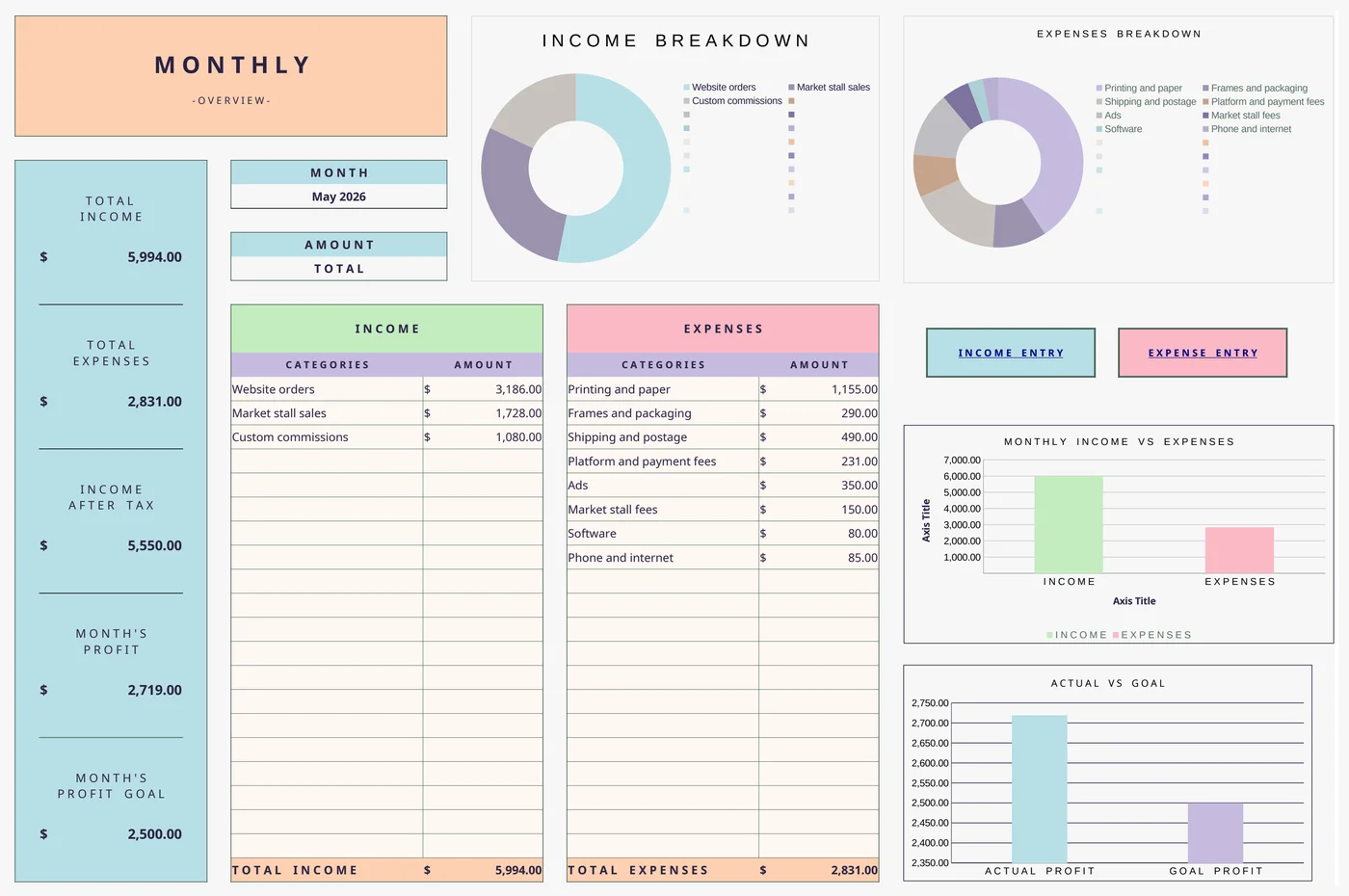
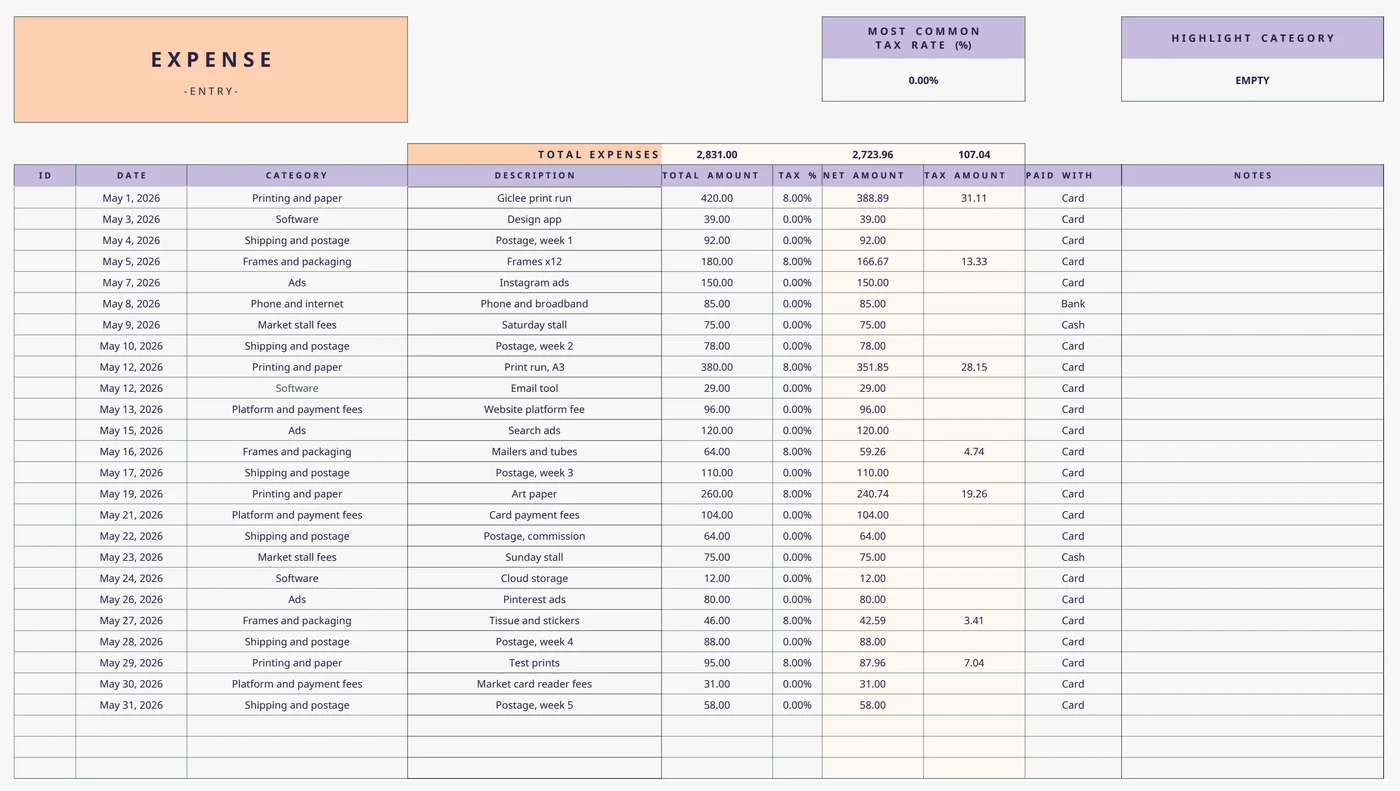
Consider one month for a sample one-person print shop that sells art prints online and at a weekend market. In May it logged 8 sales and 25 expense lines, with an 8% sample sales tax on sales and on supplies (our sample, built 4 Oct 2026). We then entered all 33 lines into the Easy Bookkeeping Sheet itself, and its totals match the tables below to the cent.
First, the log by category. "Paid or received" includes tax, as on a receipt.
| Category | Lines | Paid or received | Tax in it | Without tax |
|---|---|---|---|---|
| Website orders | 5 | $3,186.00 | $236.00 | $2,950.00 |
| Market stall sales | 2 | $1,728.00 | $128.00 | $1,600.00 |
| Custom commissions | 1 | $1,080.00 | $80.00 | $1,000.00 |
| Income total | 8 | $5,994.00 | $444.00 | $5,550.00 |
| Printing and paper | 4 | $1,155.00 | $85.56 | $1,069.44 |
| Frames and packaging | 3 | $290.00 | $21.48 | $268.52 |
| Shipping and postage | 6 | $490.00 | $0.00 | $490.00 |
| Ads | 3 | $350.00 | $0.00 | $350.00 |
| Platform and payment fees | 3 | $231.00 | $0.00 | $231.00 |
| Market stall fees | 2 | $150.00 | $0.00 | $150.00 |
| Phone and internet | 1 | $85.00 | $0.00 | $85.00 |
| Software | 3 | $80.00 | $0.00 | $80.00 |
| Expenses total | 25 | $2,831.00 | $107.04 | $2,723.96 |
Then the statement itself, for May:
| Profit and loss, May (sample shop) | Amount |
|---|---|
| Revenue (sales without the sales tax collected) | $5,550.00 |
| Direct costs (printing, paper, frames, packaging, as paid) | $1,445.00 |
| Gross profit | $4,105.00 |
| Operating expenses (postage, ads, fees, stall, phone, software) | $1,386.00 |
| Net profit | $2,719.00 |
| Monthly profit goal | $2,500.00 (beaten by $219.00) |
Printing and paper make up 40.8% of all spending in our sample (calculated 4 Oct 2026), so a price rise from the print supplier would hit profit first. Website orders bring in 53.2% of revenue (same sample, 2026), which shows where marketing time has paid off.
Which tax column should your P&L read?
For a US seller who is not charging VAT, read income without the sales tax you collected, and expenses at the price you paid. Get either side wrong and profit comes out too high.
The sample May, read three ways:
| How the P&L reads the log | Income | Expenses | Profit | Off by |
|---|---|---|---|---|
| Tax included on both sides | $5,994.00 | $2,831.00 | $3,163.00 | $444.00 too high |
| Without tax on both sides | $5,550.00 | $2,723.96 | $2,826.04 | $107.04 too high |
| Income without tax, expenses as paid | $5,550.00 | $2,831.00 | $2,719.00 | Correct for this sample |
The rule comes from the IRS instructions for Schedule C. Sales taxes "imposed on the buyer that you were required to collect and pay over to state or local governments" are, in the IRS's words, "not included in gross receipts or sales nor are they a deductible expense". On the purchase side, sales taxes on property bought for your business are not deducted separately: "treat these taxes as part of the cost of the property" (IRS Instructions for Schedule C).
Some states impose sales tax on the seller instead. Then the same instructions put the tax you collected into gross receipts and deduct it as a tax, so net profit lands on the same $2,719.
In the UK, GOV.UK says you "can reclaim VAT on items you buy for use in your business if you're VAT registered" (GOV.UK), so a VAT-registered business reads both sides without VAT.
Check how your own template treats the amount column. In the Easy Bookkeeping Sheet, the amount you enter includes tax, and the sheet works out the tax as amount minus amount ÷ (1 + rate). With the sample May entered, its overviews show income after tax of $5,550, expenses of $2,831 and a profit of $2,719 (workbook capture, 4 Oct 2026), which is the US reading above.

What doesn't a profit and loss statement show?
A P&L shows whether the business made money. It leaves out three numbers you need alongside it.
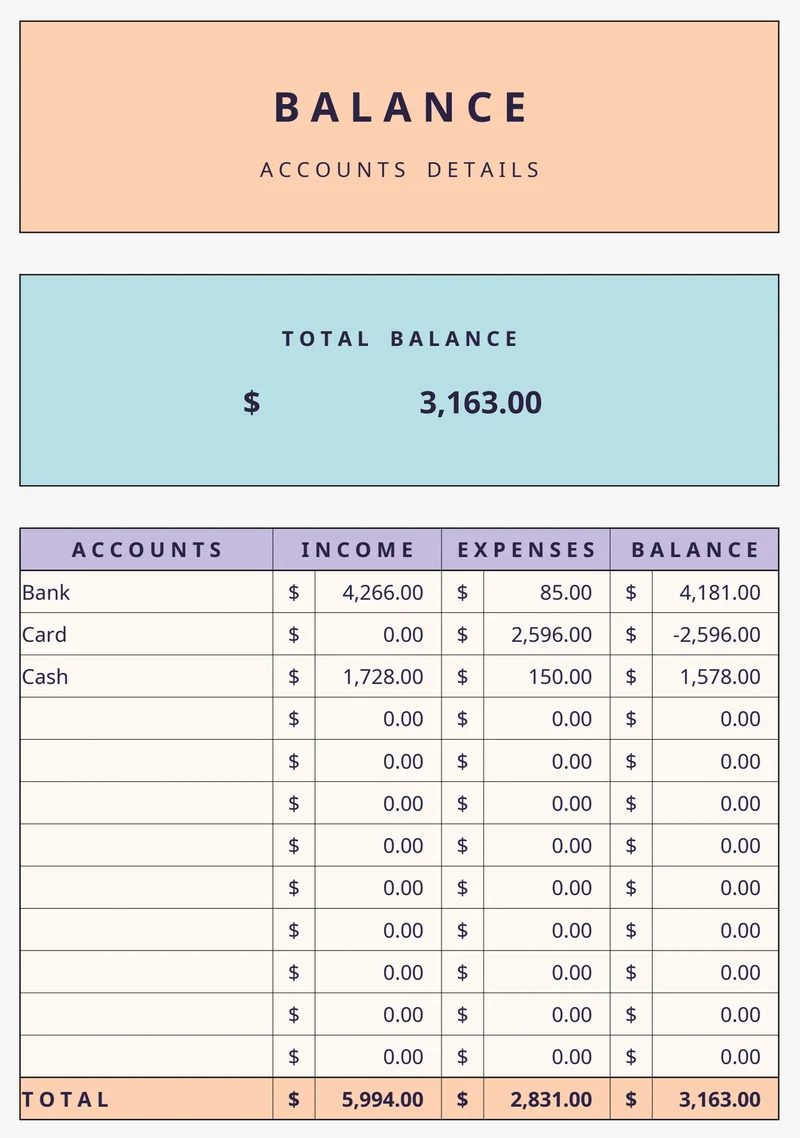
- Cash on hand. Profit is not your bank balance. With the sample May entered, the workbook's Balance tab shows $3,163 across bank, card and cash: the $2,719 profit plus $444 of sales tax the shop does not own.
- Tax to set aside. The $444 goes to the state. Income tax and self-employment tax on the $2,719 come on top, since the Schedule C instructions send net profit to Schedule SE, line 2, as well as to your income tax return.
- Unpaid invoices. On the cash method, the IRS says you "include in your gross income all items of income you actually or constructively received during the tax year" (IRS Publication 538). Let's say the shop invoices a gift shop $750 on 28 May and is paid on 12 June. That sale belongs to June's P&L, and May's statement never shows it is owed.
So keep the statement next to a balance for each account and a list of what customers owe you. A bookkeeping spreadsheet that tracks cash, bank and card balances next to the P&L covers the first; unpaid invoices need their own list.
How often should you run a profit and loss statement?
Run one monthly if your business records more than a handful of transactions; that catches a supplier's price increase while you can still respond. Quarterly statements work if you mostly need the P&L to plan estimated tax payments. Either way, run a full-year statement at year-end for your tax return.
Start the year in the month your tax year does. A US sole owner usually reports on the calendar year. A UK sole trader's tax year begins on 6 April, so an April start comes close, with a five-day adjustment explained in our five-checks guide to bookkeeping spreadsheets.
Why Trust This Article
The Cosmo Suite team, who make the Easy Bookkeeping Sheet, wrote this guide, so we are not neutral about spreadsheets. Read more about who runs this site and our editorial policy on sources and corrections. Our methodology: the worked month is a sample we built to show the math, not customer data. Every figure was recalculated line by line on 4 October 2026, and the screenshots are captures of the workbook with that sample entered. The rules quote the IRS, business.gov.au and GOV.UK pages linked above, opened that day. If one has changed, contact us through the site. This is record keeping, not tax advice; ask a tax professional before you act.
Where the Easy Bookkeeping Sheet Fits
Most of the work in a P&L is getting every sale and cost into one log, with a category and its tax. The Easy Bookkeeping Sheet (easybookkeeping.site) is built around that log. On the Setup tab you set your currency, monthly and annual profit goals, and up to 20 income and 20 expense categories. Income and expense entries take a date, category, description, amount and notes, with a per-row or default tax rate, and the net and tax amounts fill themselves.
The Monthly Overview shows income, expenses and profit against your goal. The Annual Overview builds the full-year P&L and the category matrix by month, follows your fiscal start month, and switches between total, net and tax. A Balance and Payment Methods tab tracks cash, bank and card balances across up to 12 payment methods.
It has no bank feeds, invoicing or payroll, and it does not file taxes. It is made for Excel 365 (older Excel may lose dashboard features) and Google Sheets, and costs $9 once.
If you are still weighing it against accounting software, compare what QuickBooks and its cheaper alternatives cost over a year first. To see every tab before you decide, look at the $9 profit and loss spreadsheet for Excel and Google Sheets.
Frequently asked questions
Is there a free profit and loss statement template?
Yes. Microsoft's Excel template gallery, government small-business sites and many accounting blogs offer free P&L templates. Most are a blank statement you fill in by hand, so the totals are only as good as the numbers you copy in. That is enough for a handful of transactions a month.
Can I make my own profit and loss statement for a lender or landlord?
It depends on who asks. Some lenders and landlords accept a P&L you prepare yourself and compare it with your bank statements and tax return; others want one signed by an accountant. Ask what format they need, and keep the entries and receipts behind each total.
Should a profit and loss statement include sales tax?
Usually not on the income side. Under the IRS Schedule C instructions, sales tax you collect from buyers and pay over to the state is neither gross receipts nor an expense, while sales tax you pay on business purchases is part of their cost. If your state imposes the tax on you as the seller, profit comes out the same.
What is the difference between a P&L and a cash flow statement?
A P&L shows whether the business made money over a period. A cash flow statement shows the cash that came in and went out, including money that is neither income nor expense, such as sales tax you hold for the state, owner draws or a loan.
Is a profit and loss statement the same as Schedule C?
No, but they are close. Schedule C is the IRS form a US sole proprietor uses to report business income and expenses, and its net profit comes from the same numbers a P&L summarises. The form has its own expense lines, so ask a tax professional how your categories map to them.
Excel or Google Sheets for a profit and loss template?
Either works. Google Sheets is free in a browser and on a phone, which helps if you log sales at a market stall. Excel 365 works offline, and older Excel versions can lose newer functions, so check which version a template is built for.
What is the fastest way to get a P&L that fills itself in?
Use a template where the statement reads your entries instead of one you type totals into. In the Easy Bookkeeping Sheet you log each sale and cost with its category and tax rate, and the monthly and annual overviews build the P&L. It costs $9 once, for Excel and Google Sheets.