Bookkeeping Spreadsheet: 5 Checks Before You Trust It at Tax Time
Bookkeeping spreadsheet checks: 5 tests your sheet must pass before tax time, a worked month with real numbers, and when software is the better pick.
By Easy Bookkeeping Sheet by Cosmo Suite · Editorial policy
Published · 8 min read
Most bookkeeping spreadsheets work fine in March and fall apart in January. Categories drift, tax gets estimated at the end, and the year total is retyped manually from twelve tabs. Each new category makes the file messier until the owner no longer trusts it. What fixes it is a bookkeeping spreadsheet where every tab is linked to one set of entries.
The short answer: a spreadsheet is enough for simple books if it passes five checks. One category list feeds every tab, and tax is split on every line. The profit and loss is calculated from the entries, never retyped. A category-by-month view exists that you can hand over. And the year starts in the month your tax year does.
Below is each check, a worked month that passes all five, and the point where accounting software becomes the better choice.
Bookkeeping Spreadsheets at a Glance
A bookkeeping spreadsheet is a workbook that records business transactions and totals them into profit. Options differ less in appearance than in how many of the 5 checks they pass without extra work.
| Option | What you get | Passes the 5 checks? | Best for |
|---|---|---|---|
| Blank sheet you build | Columns you choose, formulas you write | Only if you build all 5 yourself | People who enjoy formulas and have a free weekend |
| Free one-tab template | Income and expense columns, a total | Usually 1-2 (no category list, no year view) | A few transactions a month, no tax to track |
| Marketplace template | Several tabs, a styled dashboard | Varies; check each tab is linked to the entries | Buyers who read the tab list before paying |
| Linked bookkeeping workbook | Setup, entries and overviews that read one list | All 5 when the overviews read the entries | Sole traders and freelancers with a few dozen lines a month |
| Accounting software | Bank feeds, invoicing, double entry | Yes, plus a balance sheet | Payroll, stock, loans or several users |
If your option passes fewer than 4 checks, the gap shows up at tax time as retyping or guessing. The rest of this post shows what each check looks like in practice.

Why do bookkeeping spreadsheets stop being trusted?
They stop being trusted because numbers are copied instead of linked. Each copy is a place where a total can go stale.
It rarely starts that way. In month one there's one tab, ten lines and a SUM at the bottom. By month four there is a second tab for expenses with slightly different category names ("Software" here, "Subscriptions" there). By month seven the monthly totals live on a summary tab that someone typed manually. Nobody can say which number is correct.
Each of the five checks below targets one of those copy points.
Spreadsheets are still acceptable. The IRS says you "may choose any recordkeeping system suited to your business that clearly shows your income and expenses" (IRS recordkeeping guidance). What can go wrong is how the sheet is constructed, so test that directly.
What are the 5 checks?
Each check is a yes or no question you can answer within a minute with your own file open. If yours fails several, a linked sheet with one category list and tax split per line is built to pass all five.
Check 1: One category list feeds every tab
Every income and expense line picks its category from a single list, created once. For example, free typing on any row eventually produces "Ads", "Advertising" and "Facebook ads" as three separate year-total lines.
Passes if: the category on each row is picked from one setup list, and the overviews read that same list.
Check 2: Tax is split on every line
Each line records the tax rate and the tax amount, not only the total. Sales tax, VAT or GST collected on a sale isn't your income. Tax paid on a purchase may also matter to your return. Calculating it in April from totals is guesswork.
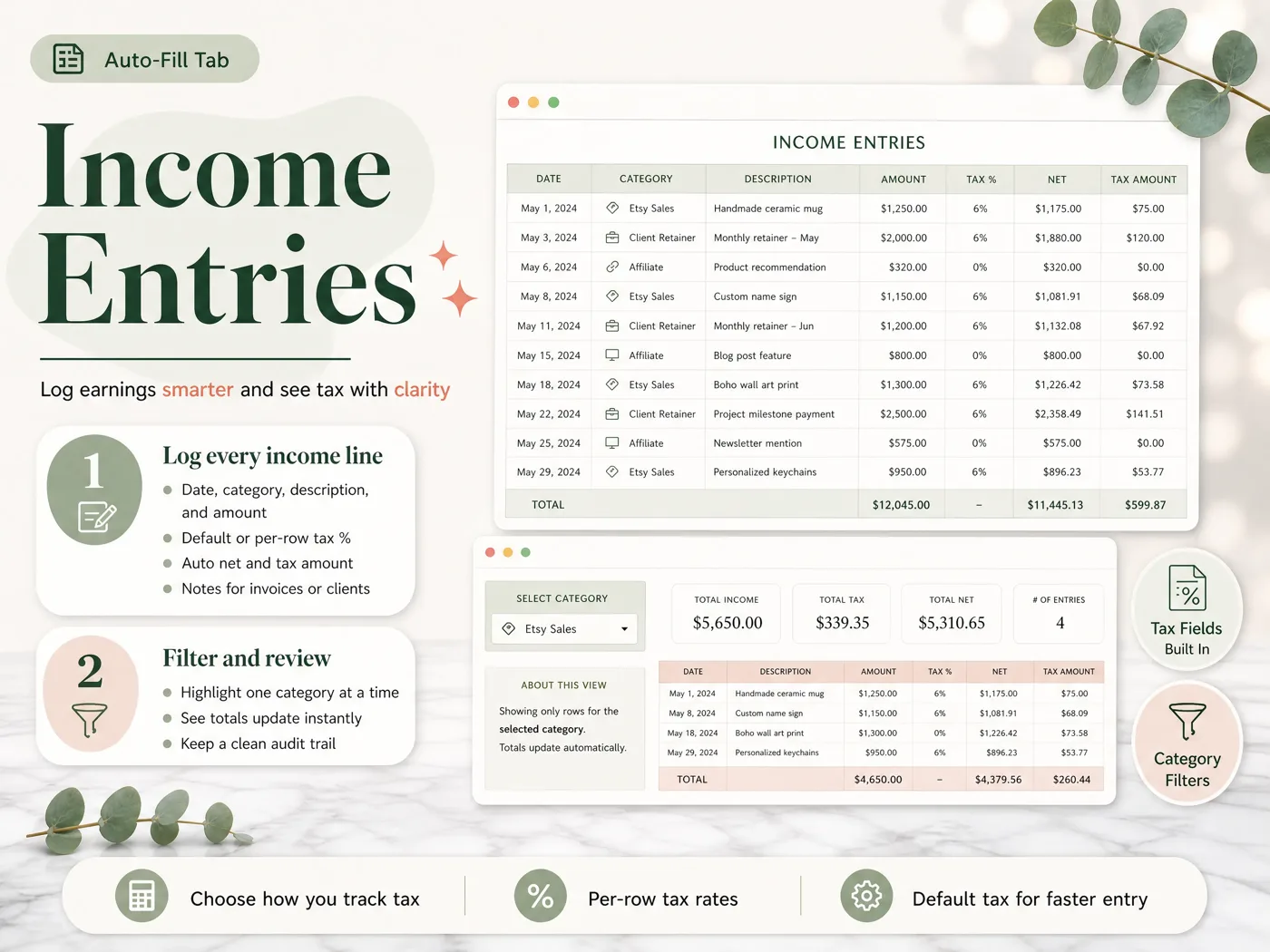
Passes if: each row has a tax % (per row, or a default you can override) and the tax amount and net amount calculate themselves.
Check 3: The profit and loss is built from the entries
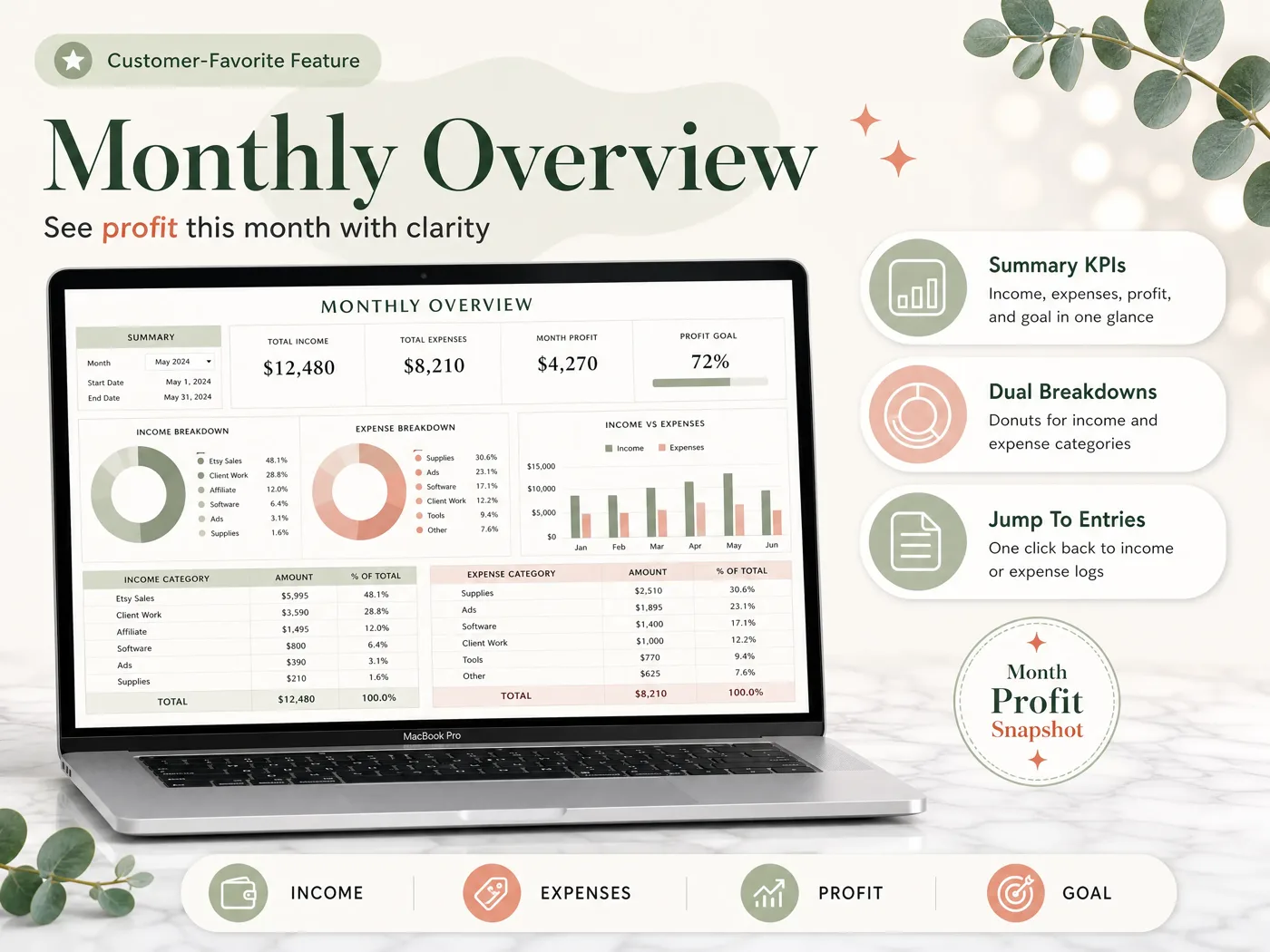
A profit and loss statement (P&L) is the summary of income minus expenses for a period. Monthly income, expenses and profit should be formulas that read the entry tabs, usually a SUMIFS by category and date. If anyone types a monthly total manually, the P&L can disagree with the entries and nothing warns you.
Passes if: you add one expense line and the month's profit changes without you touching the overview.
Check 4: There is a category-by-month view you can hand over
At year-end your accountant (or your tax software) wants each category totalled for the year. For a US sole proprietor, those totals feed Schedule C (Form 1040), which reports income or loss from a business. A table with categories down the side and months across the top answers that on one page. It also reveals unusual months instantly.
Passes if: one tab shows every income and expense category against all 12 months, with totals for each.
Check 5: The year starts when your tax year starts
A fiscal year is the 12-month period your books and tax return cover. A US sole trader usually reports on the calendar year, while plenty of businesses use their own fiscal year. A sheet that only recognizes January to December forces you to rebuild the year view.
The UK is the awkward case. The tax year runs from 6 April to 5 April (GOV.UK), but a month setting cannot start a year on the 6th. An April start gives you 1 April to 31 March, so entries dated 1 to 5 April land in the wrong year. If your accounting dates differ from the tax year, GOV.UK explains how profits are allocated across 2 periods. Treat the April view as a working total, then move or adjust those first five days of April before you file.
Passes if: you set the fiscal start month once, the annual view follows it, and you know which dates need manual adjustment.
What does a month look like when all 5 checks pass?
Here is one freelance designer's March: 6 client payments and 22 expenses, against a monthly profit goal of $4,000.
| Category | Lines | Amount | % of expenses |
|---|---|---|---|
| Income: Client work | 6 | $7,500.00 | |
| Equipment (laptop, price paid incl. 8% sales tax) | 1 | $1,299.00 | 51.1% |
| Ads & Marketing | 3 | $420.00 | 16.5% |
| Software | 6 | $310.00 | 12.2% |
| Education | 2 | $180.00 | 7.1% |
| Phone & Internet | 2 | $135.00 | 5.3% |
| Coworking day passes | 4 | $100.00 | 3.9% |
| Office Supplies | 4 | $96.00 | 3.8% |
| Expenses total | 22 | $2,540.00 | 100% (rounded) |
| Profit | $4,960.00 | 124% of the $4,000 goal |
Read it the way you would at tax time:
- Check 1: 7 expense categories, all picked from the setup list. No stray names.
- Check 2: every amount here is what was paid, tax included. The laptop's $1,299 at 8% splits into $1,202.78 net and $96.22 tax ($1,299 ÷ 1.08), and the expense total uses the $1,299 paid. If your sheet treats amounts as before tax, it adds 8% on top instead ($103.92, for $1,402.92). Enter one receipt you know and check which way it works.
- Check 3: profit is $7,500 minus $2,540, computed from the 28 entry lines, not typed.
- Check 4: March becomes one column in the category matrix, next to February and April.
- Check 5: with a January start, March is month 3 of the year. With an April start, it's the final month of the year. For a UK return, remember the 1 to 5 April boundary from Check 5.
The laptop accounts for half of March's spending. One large purchase can dominate a single month, which is why the annual view matters.
What should the spreadsheet not try to do?
A spreadsheet is a log plus overviews. It stops being the right tool at a few clear points:
- Payroll. Withholding and payroll filings belong in payroll software.
- Bank reconciliation at volume. For instance, with hundreds of card transactions a month, bank feeds save real time.
- Inventory. Counting stock and cost of goods across many products needs a system built for it.
- Several people entering at once, with permissions per person.
- A balance sheet. Loans, assets and equity need double-entry books.
If none of those apply, software mostly adds a monthly subscription. Our guide to QuickBooks alternatives grouped by why people leave compares the options with their current prices.
A spreadsheet also doesn't replace the paperwork behind it. The IRS lists the supporting documents your books depend on: "sales slips, paid bills, invoices, receipts, deposit slips, and canceled checks." Keep them. Note the invoice or receipt number in each line's notes column so you can locate them later.
How long to keep them depends on the return. The general IRS rule is 3 years from filing, with longer periods in some cases (IRS: how long to keep records). In the UK, GOV.UK's guidance for the self-employed sets its own periods. Ask a tax professional for your situation.
Why Trust This Article
The Cosmo Suite team behind the Easy Bookkeeping Sheet wrote this guide. Read more about who runs this site. Our methodology: the 5 checks map to the places where a sheet copies a number instead of linking it. The worked month is a sample created to demonstrate the math, not customer data. Its figures were recalculated on 3 October 2026. The record-keeping rules quote the IRS and GOV.UK pages linked above. We opened each on that date, following our editorial policy on sources and corrections. If a rule has changed, contact us through the site. We aren't tax advisers, so verify anything tax-related with a professional before you act.
Where the Easy Bookkeeping Sheet Fits
The difficult part of a bookkeeping spreadsheet is linking every tab to one list and one set of entries. That is what the Easy Bookkeeping Sheet is built around.
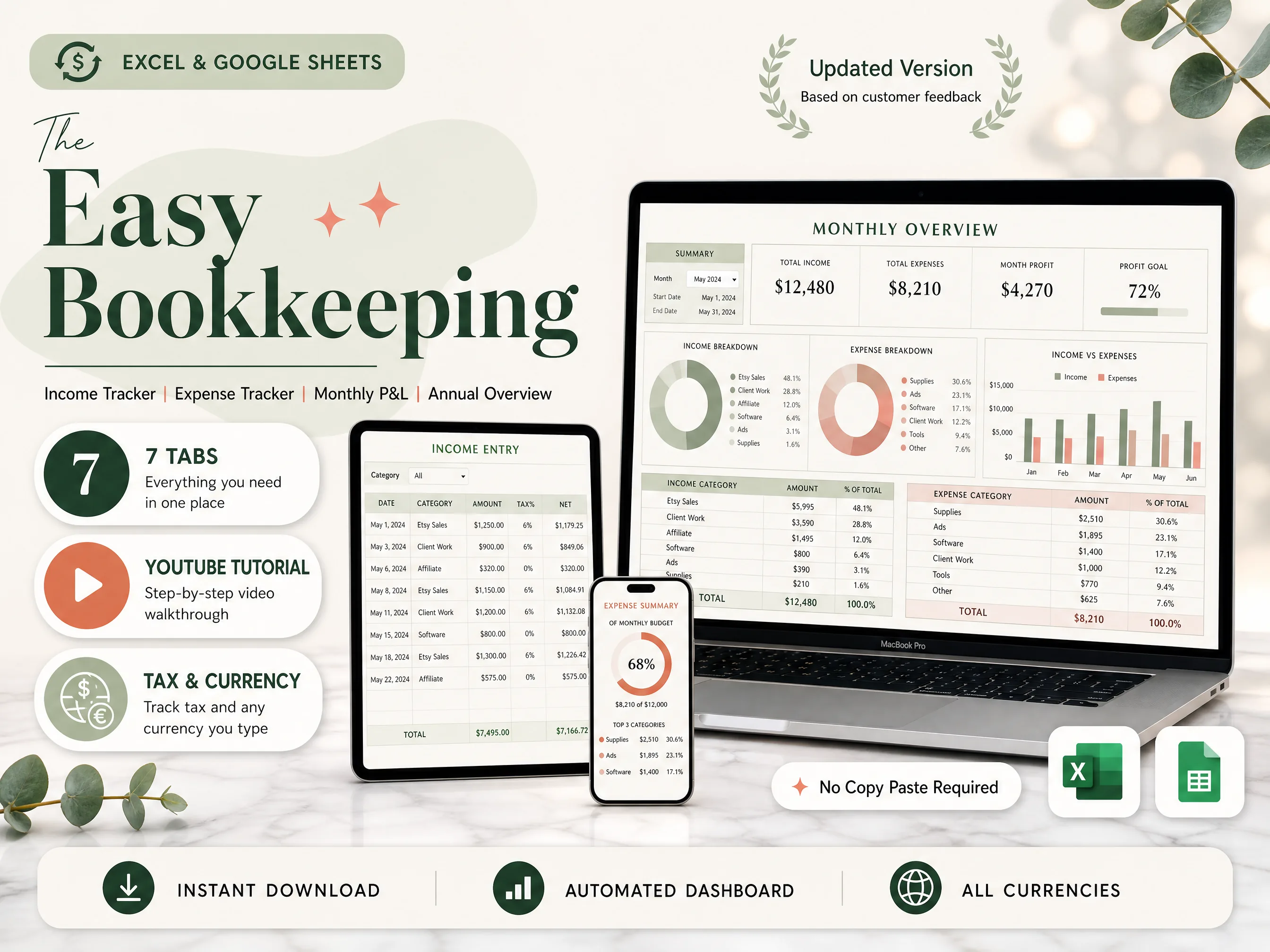
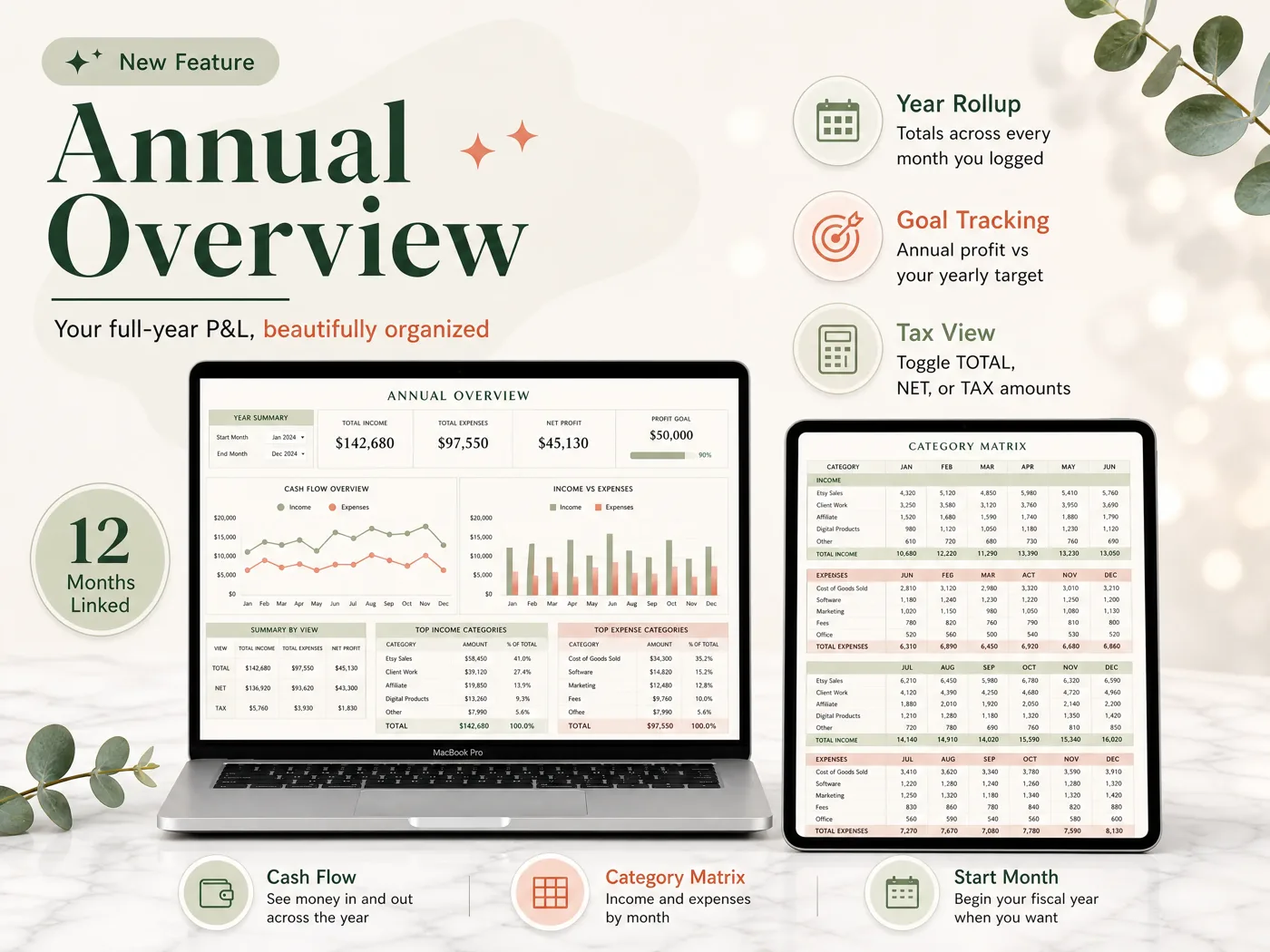
You set your currency, monthly and annual profit goals, and up to 20 income and 20 expense categories on the Setup tab. Income and expense entries take a date, category, description, amount and notes, with a per-row or default tax rate. The net and tax amounts calculate automatically. The Monthly Overview shows income, expenses and profit against your goal, with category tables and an income-vs-expense chart. The Annual Overview builds the full-year P&L, a cash-flow view and the category matrix by month. It follows your fiscal start month and toggles between total, net and tax. A Balance and Payment Method tab tracks cash, bank and card balances across up to 12 payment methods.
It has no bank feeds, invoicing or payroll. It is made for Excel 365 (older Excel may lose dashboard features) and Google Sheets, and costs $9 once.
If QuickBooks moved you onto a plan you did not choose, read our QuickBooks Solopreneur review for former Self-Employed users. To see every tab before you decide, the $9 bookkeeping spreadsheet for Excel and Google Sheets shows them all.
Frequently asked questions
Is a spreadsheet good enough for small business bookkeeping?
Yes, for simple books. If you are one person with a few dozen transactions a month, no staff and no stock to count, a spreadsheet that passes the 5 checks in this post is enough. The IRS lets you use any system that clearly shows income and expenses. Once you run payroll or need bank feeds, use software.
What columns should a bookkeeping spreadsheet have?
At least date, category, description, amount and tax for every line, plus a notes column for the invoice or receipt number. A payment method column is worth adding too. Keep income and expenses on separate tabs with the same columns, so totals and filters work the same way on both.
Is a bookkeeping spreadsheet the same as single-entry bookkeeping?
Mostly, yes. A spreadsheet log records each transaction once, as money in or money out, which is single-entry bookkeeping. It shows profit and cash but not a balance sheet with assets and liabilities. That trade is fine for most sole traders and freelancers; double entry is for businesses with loans, stock or staff.
How long does it take to keep the books in a spreadsheet?
It depends on how many lines you have and how often you enter them. Entering a few lines each week takes far less time than a year of receipts in January, and a sheet with a fixed category list means fewer decisions per line. Time one week of your own entries before you commit to a routine.
Can my accountant work from a spreadsheet?
Usually, yes. What an accountant needs at year-end is income and expenses totalled by category, the tax amounts, and the receipts behind them. A category-by-month view gives them that on one page. Ask yours first, because some prefer access to their own software, and send the file rather than a screenshot.
Excel or Google Sheets for bookkeeping?
Either works for the 5 checks. Google Sheets is free in a browser and on a phone, which helps if you log sales on the go. Excel 365 runs larger files well and works offline. Older Excel versions can lose newer functions, so check the version a template needs before you buy it.
What is the fastest way to get a bookkeeping spreadsheet that passes all 5 checks?
Start from a template that already links entries to the overviews instead of building the formulas yourself. The Easy Bookkeeping Sheet is one: you set categories and a fiscal start month once, log entries with tax per line, and the monthly and annual overviews fill in. It costs $9 once, for Excel and Google Sheets.