7 Cheaper QuickBooks Alternatives That Do the Same Job for a Small Business (2026)
QuickBooks alternative options grouped by why you are leaving: 7 picks with list prices checked 3 Oct 2026, a 3-year cost table, and what you give up in each.
By Easy Bookkeeping Sheet by Cosmo Suite · Editorial policy
Published · 8 min read
Most people searching for a QuickBooks alternative are leaving for one of three reasons. The subscription keeps rising. They pay for features they never open. Or a plan change removed something they relied on.
The short answer: choose by the reason. If price is the problem, Wave, Zoho Books or Xero handle the core job for less. If you only need income, expenses and profit for your tax return, free desktop software or a spreadsheet costs close to nothing. If you need payroll and inventory, QuickBooks may still be the better place to stay.
All prices below are list prices from each vendor's own pricing page, checked on 3 October 2026, before intro discounts.
QuickBooks Alternatives at a Glance
A QuickBooks alternative is any tool that takes over the jobs you use QuickBooks for: recording income and expenses, invoicing, and producing tax-time reports. Seven alternatives cover nearly every reason to leave. Their monthly list prices run from $0 to $27, against QuickBooks Simple Start at $38.
| Alternative | List price (3 Oct 2026) | What you give up vs QuickBooks | Best for |
|---|---|---|---|
| Wave | Starter $0; Pro $19/mo | Bank auto-import is Pro only | Freelancers who invoice and want $0 |
| Zoho Books | Free under $50K revenue; Standard $20/mo | Free plan: 1 user, 1,000 invoices a year | Small firms that want a real ledger cheaply |
| Xero | Early $27/mo | Early caps you at 20 invoices, 5 bills a month | Owners whose accountant uses Xero |
| FreshBooks | Lite $23/mo | Lite bills 5 clients only | Service businesses that live in invoicing |
| Akaunting | Free self-hosted; cloud from $12/mo | You host and update it yourself | Technical owners who want open source |
| GnuCash | Free | Desktop only; a double-entry learning curve | People who want full books at $0 |
| A bookkeeping spreadsheet | $0 to build; templates from a one-time fee | No bank feeds, invoicing or payroll | Sole traders with a few dozen lines a month |
If you send invoices daily, consider the first four rows. If you mostly record what came in and went out, consider the last three.
Why are small businesses leaving QuickBooks?
Mostly it's the cost, measured against how little of the product they use.
QuickBooks Online lists at $38 a month for Simple Start, $85 for Essentials and $140 for Plus (QuickBooks pricing). Intuit's own notice says Essentials, Plus and Advanced prices change for renewals on or after 1 August 2026 (Intuit price changes).
For a one-person business, that fee can be a noticeable share of revenue, as the dog-walker example further down shows. If your books are that simple, a one-time $9 bookkeeping spreadsheet for income, expenses and profit ends the monthly bill.
QuickBooks now also lists a Free plan, with 2 invoices a month and 1 connected bank. If that covers you, it may be the cheapest move of all.
The second reason is the Self-Employed to Solopreneur switch, which changed how some users could manage their own categories. We cover that in our QuickBooks Solopreneur review for former Self-Employed users.
Which QuickBooks alternative fits why you are leaving?
Match the alternative to your reason first, then to your transaction volume.
Wave: the $0 option for invoicing
Wave Starter costs $0 and keeps invoicing and accounting free. The change long-time users notice: automatic bank transaction import is in Pro at $19 a month or $190 a year (Wave pricing). On Starter you enter or upload transactions yourself.
Best for: freelancers who send a handful of invoices and are happy to enter bank lines by hand.
Zoho Books: a full ledger, free up to a revenue cap
Zoho Books offers a free plan for businesses whose annual revenue stays under $50K, with 1 user plus an accountant and up to 1,000 invoices a year. Standard lists at $20 a month, or $15 a month billed yearly (Zoho Books pricing).
Best for: small firms that want double-entry books, reports and an accountant login without the QuickBooks price.
Xero: the accountant-friendly switch
Xero's US plans list at $27 (Early), $59 (Growing) and $97 (Established) a month. Early allows 20 invoices and 5 bills a month; the higher plans are unlimited (Xero pricing).
Best for: owners whose accountant already works in Xero, where the shared login saves more than the fee.
FreshBooks: when invoicing is the business
FreshBooks Lite lists at $23 a month for up to 5 billable clients. Plus is $43 for 50 clients and Premium $70 for unlimited, according to its pricing page.
Best for: consultants and agencies who bill time and expenses to a few clients.
Akaunting: open source, if you host it
Akaunting describes itself as open source and free accounting software that you can run on your own server. Its cloud plans start at $12 a month, or $8 a month billed yearly.
Best for: technical owners comfortable with hosting and updates.
GnuCash: full double-entry books at $0
GnuCash is free desktop software under the GNU GPL, for Linux, Windows and macOS (GnuCash). Double-entry bookkeeping is the method where every transaction debits one account and credits another by the same amount, and GnuCash enforces it. It has no cloud version, and learning it takes time.
Best for: people who want proper books at no cost and do not mind learning debits and credits.
A bookkeeping spreadsheet: when you only need the tax-time numbers
If what you use QuickBooks for is "money in, money out, profit by category", a linked spreadsheet does that job. The IRS lets you choose "any recordkeeping system suited to your business that clearly shows your income and expenses" (IRS recordkeeping guidance). A sheet has no bank feeds, invoicing or payroll. We sell one: a linked bookkeeping sheet with a monthly and yearly profit and loss. What it needs to get right is covered in our guide to the 5 checks a bookkeeping spreadsheet must pass before tax time.
Best for: sole traders and side businesses with a few dozen transactions a month.
What does each option cost over 3 years?
Over 3 years the gap between options is larger than any monthly price suggests. The table multiplies each list price (monthly, or the stated yearly rate) across 36 months. It assumes no intro discount and no price change.
| Option | Monthly list | 3-year cost |
|---|---|---|
| QuickBooks Online Essentials | $85 | $3,060 |
| QuickBooks Online Simple Start | $38 | $1,368 |
| Xero Early | $27 | $972 |
| FreshBooks Lite | $23 | $828 |
| Wave Pro (billed yearly) | $190/yr | $570 |
| Zoho Books Standard (billed yearly) | $15 | $540 |
| Akaunting cloud Standard (billed yearly) | $8 | $288 |
| QuickBooks Free, Wave Starter, Zoho Free, GnuCash | $0 | $0 |
| Easy Bookkeeping Sheet (one-time) | n/a | $9 |
Consider one sample sole trader: a dog walker with $20,000 of income in a year, entered in the sheet by category.
| Category (sample year) | Amount | Share of income |
|---|---|---|
| Income: Dog walking | $20,000.00 | 100% |
| Insurance | $520.00 | 2.6% |
| Phone & Internet | $480.00 | 2.4% |
| Supplies (leads, bags, treats) | $640.00 | 3.2% |
| Software | $360.00 | 1.8% |
| Ads & Marketing | $300.00 | 1.5% |
| Expenses total | $2,300.00 | 11.5% |
| Profit | $17,700.00 | 88.5% |
Add bookkeeping software to that expense list and the cost appears in profit. Simple Start at $456 a year would be 2.3% of income, a bigger line than software or marketing, and would reduce profit to $17,244. The $9 sheet is 0.05% in year one and nothing after. With a few dozen lines a month, as here, the sheet covers the job. With hundreds, bank feeds would justify their fee.
The $0 rows save money but cost you time or impose limits.
What do you give up when you leave QuickBooks?
You give up whatever QuickBooks was doing automatically, so list those jobs before you cancel. Bank feeds are automatic imports of your bank and card transactions into the books, and they're usually the biggest loss.
- Bank feeds. For example, if you reconcile hundreds of card lines a month, losing them costs hours. Wave Pro, Zoho, Xero and FreshBooks sync them continuously. GnuCash can download statements over OFX Direct Connect or HBCI where your bank supports it, and can import OFX/QIF files (GnuCash features), but that is a download you run, not a synced feed, and bank support varies by country. A spreadsheet has neither.
- Payroll and contractor forms. Moving payroll is a separate project. If you run payroll, pick software that does it before anything else.
- Your history. Export reports and transaction lists to Excel or CSV while you still have access. Categories and rules rarely import cleanly anywhere.
- Your accountant's workflow. Ask what they accept. Many take a category summary in a spreadsheet; some want their own software. The SBA's guide to managing your finances notes that a bookkeeper costs less for day-to-day work, while a CPA offers more tailored service.
Before you choose, count your transactions. Pull last month's bank and card statements and count the business lines. If there are a few dozen, with no staff and no stock, you're paying for automation you barely use. If they run into the hundreds, a tool with bank feeds earns its fee.
Why Trust This Article
This comparison comes from the Cosmo Suite team, which makes the Easy Bookkeeping Sheet, one of the options listed, so we aren't neutral. Read more about who runs this site. Our methodology: every price comes from the vendor's own pricing page, opened on 3 October 2026, and the 3-year and sample-year figures were calculated from those list prices. Each software option is marked for the cases where it's the better pick. We follow our editorial policy on sources and corrections; if a price has changed, contact us through the site. Prices change often and intro offers vary by region, so check each page before you switch.
Where the Easy Bookkeeping Sheet Fits
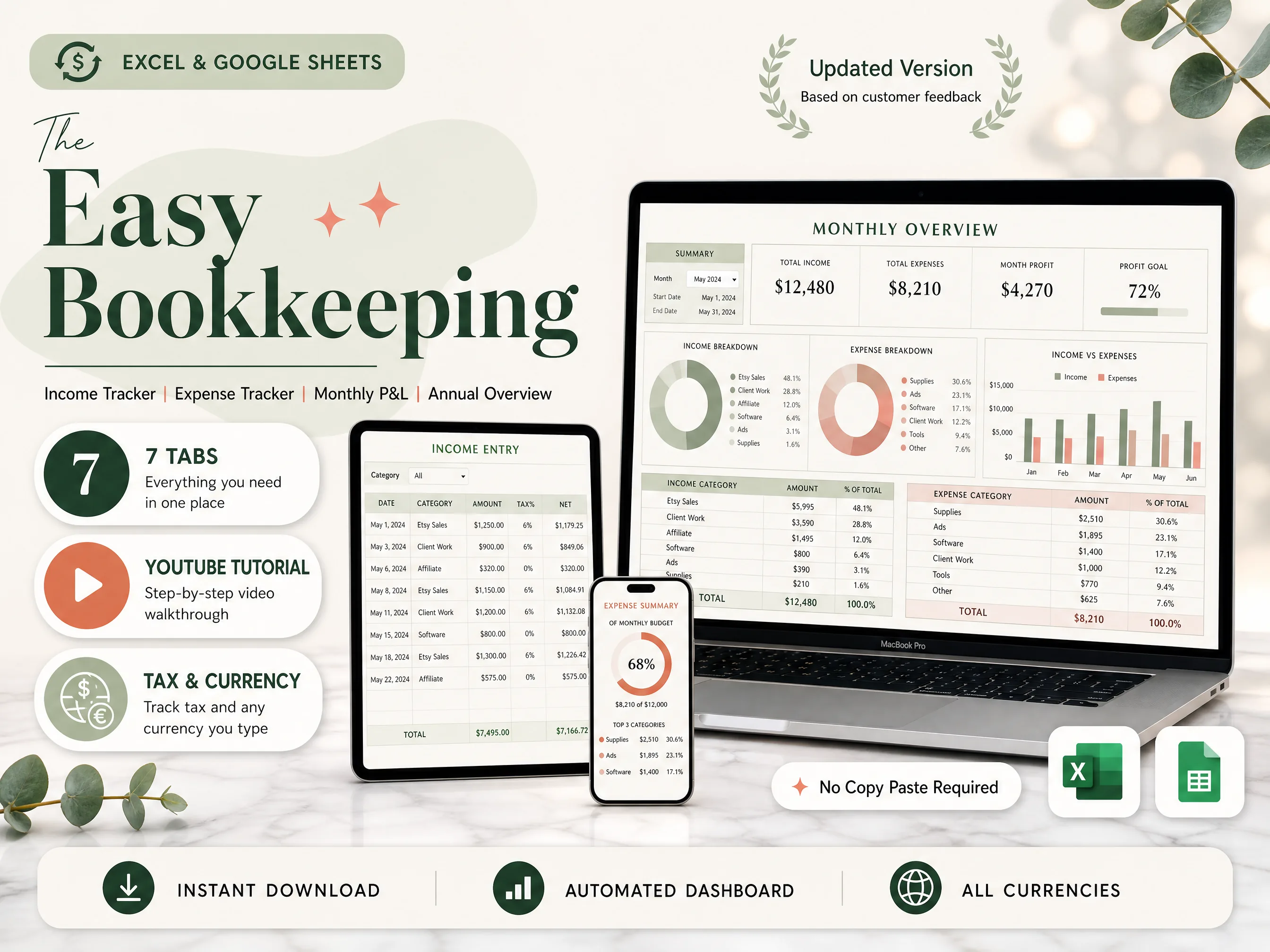
Many people leaving QuickBooks need only a few things: categories they control, tax per line, and a monthly and yearly profit and loss for an accountant. The Easy Bookkeeping Sheet is built for that.
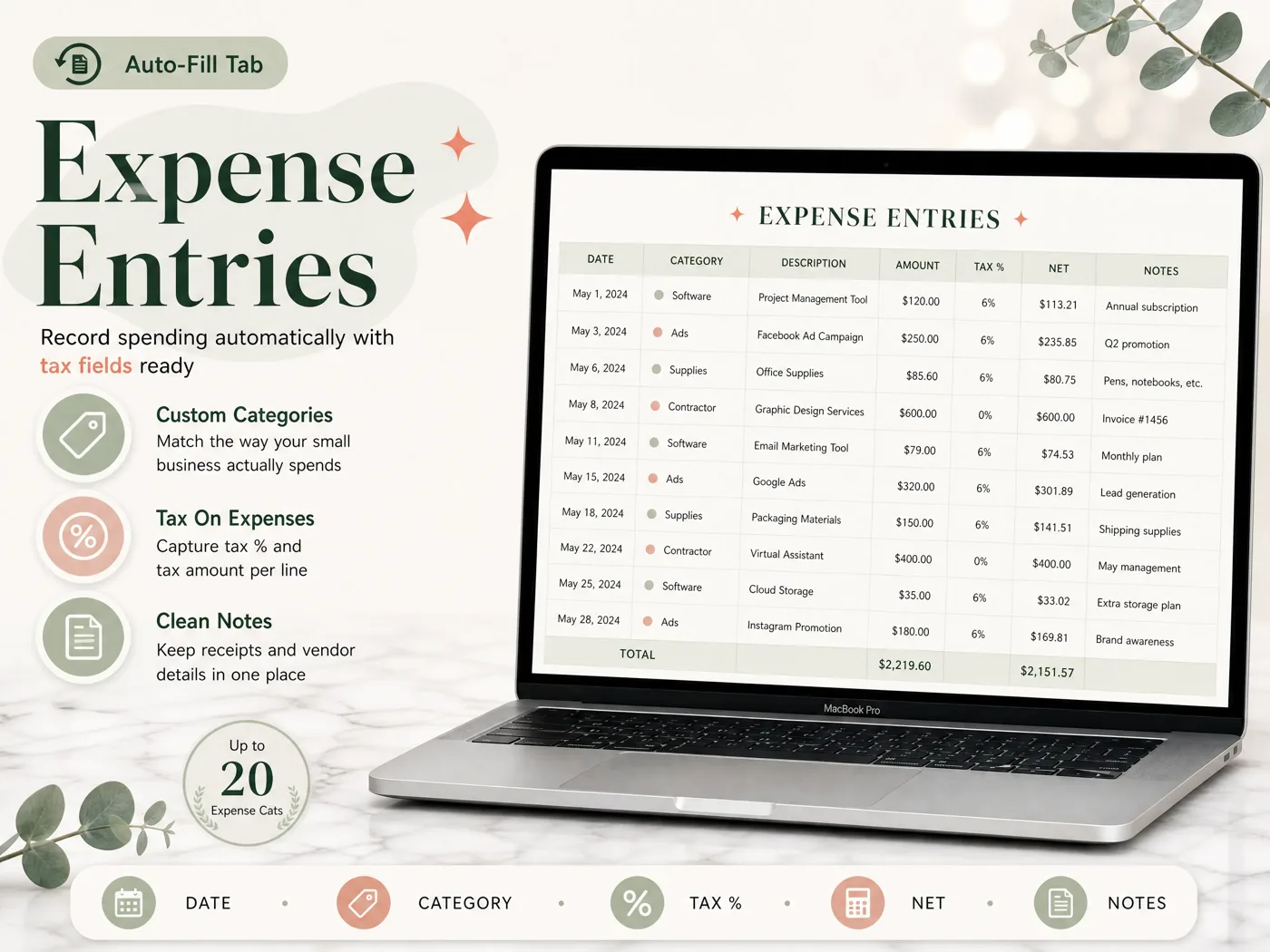
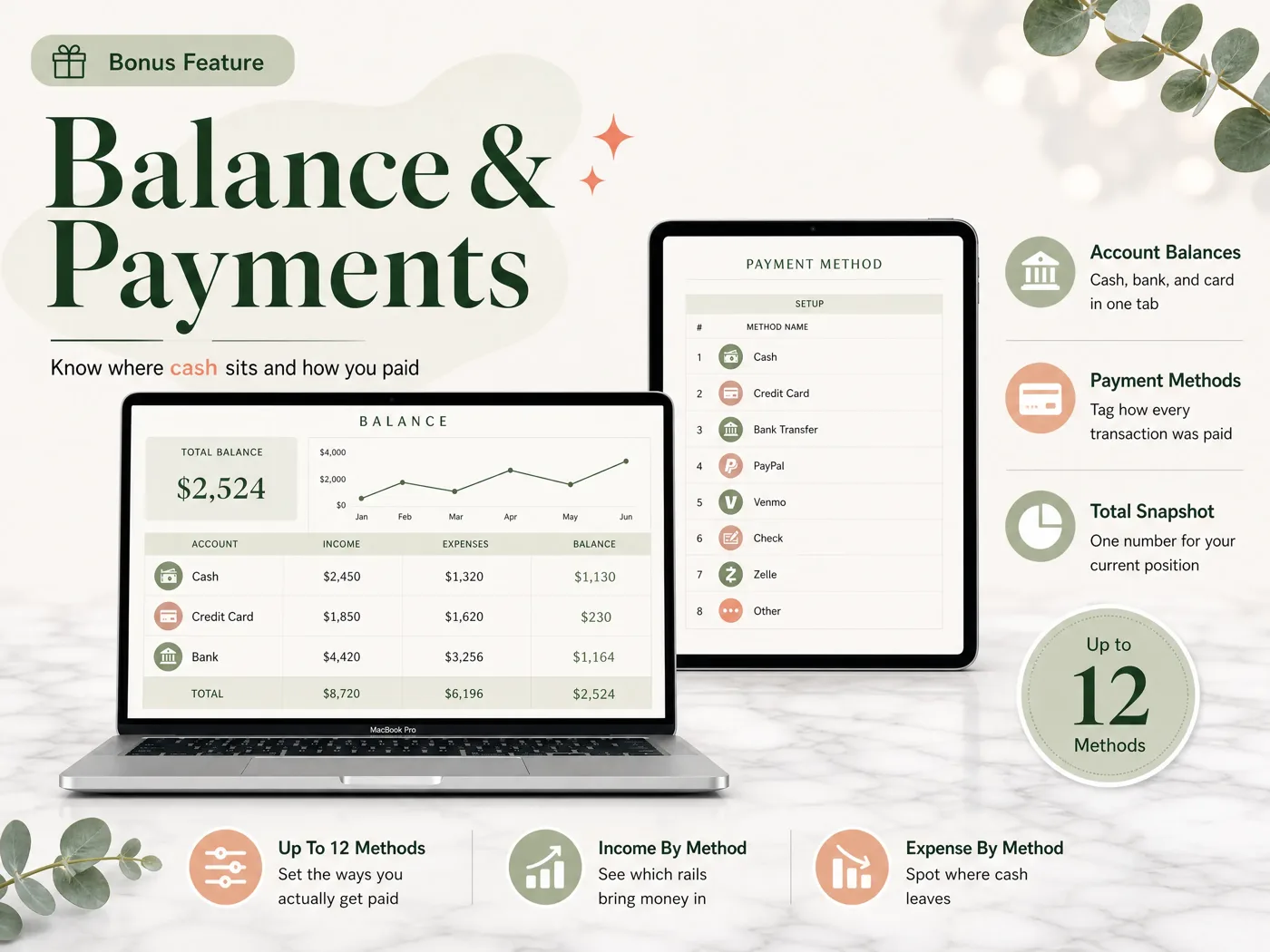
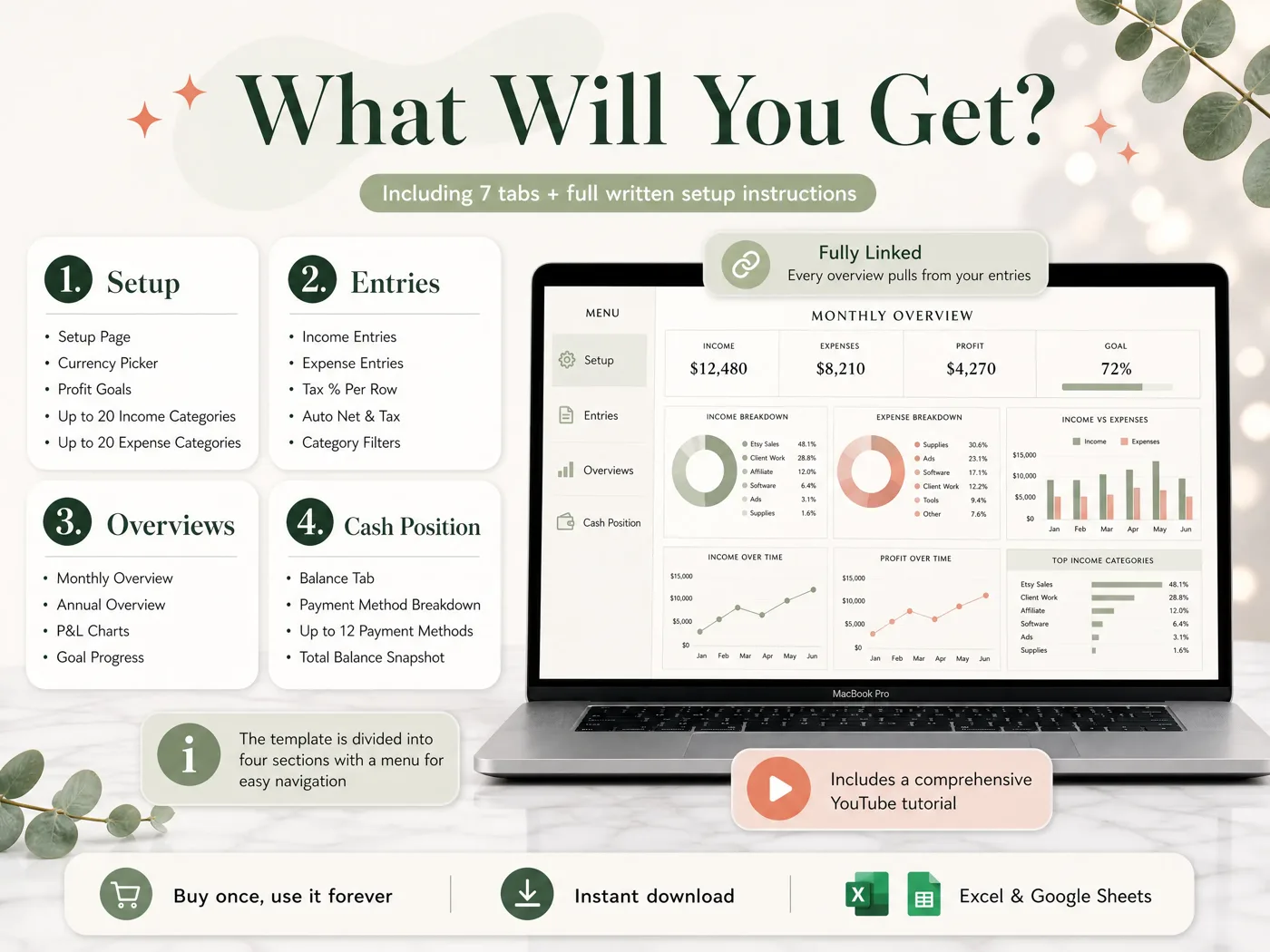
On the Setup tab you set your currency, profit goals and up to 20 income and 20 expense categories. Every income and expense entry takes a date, category, description, amount and notes, with a per-row or default tax rate that fills in the net and tax amounts. The Monthly Overview shows income, expenses and profit against your goal. The Annual Overview builds the full-year P&L, a cash-flow view and a category matrix by month from your own fiscal start month. A Balance and Payment Method tab tracks cash, bank and card balances across up to 12 payment methods.
It does not connect to your bank, send invoices or run payroll. It works in Excel 365 and Google Sheets and costs $9 once. You can see every tab of the bookkeeping template for Excel and Google Sheets.
Frequently asked questions
What is the cheapest QuickBooks alternative?
For software, GnuCash and self-hosted Akaunting cost nothing, and Wave Starter and Zoho Books Free have $0 plans with limits. For a sole trader with simple books, a spreadsheet template is the cheapest paid option, from free to a one-time fee. QuickBooks itself now lists a Free plan with 2 invoices a month.
Is Wave still free?
Partly. On 3 October 2026, Wave's pricing page listed Starter at $0, but automatic bank transaction import sits in the Pro plan at $19 a month or $190 a year. On Starter you enter or upload transactions yourself. Invoicing remains on the free plan.
Can I move my QuickBooks data to another program?
Usually, yes, but plan it. Export your reports first (profit and loss, transaction lists by date, customer and vendor lists) to Excel or CSV while you still have access. Most alternatives import CSV transactions, but categories and rules rarely carry across cleanly, so expect to map them by hand once.
Is Xero cheaper than QuickBooks?
At the entry level, yes. Xero's US Early plan listed at $27 a month on 3 October 2026, against $38 for QuickBooks Simple Start. Early limits you to 20 invoices and 5 bills a month, so compare it with your volume. Both advertise intro discounts; compare list prices.
Do I need accounting software if I am self-employed?
Not always. If you have no staff, no stock and a few dozen transactions a month, a well-built spreadsheet can show income, expenses and profit for your tax return. You need software for payroll, high-volume bank reconciliation or a full balance sheet. Ask your accountant what format they want.
Are QuickBooks prices going up in 2026?
For some plans. Intuit's price-change notice says monthly prices for QuickBooks Online Essentials, Plus and Advanced change for renewals on or after 1 August 2026, and that Simple Start is not changing. Check the notice and your own renewal email for the figure that applies to you.
What is the fastest way off QuickBooks for simple books?
Export a year of transactions and your profit and loss to Excel, set up the same categories in your new tool, and enter this year from the first month. If your books are simple, a linked spreadsheet such as the Easy Bookkeeping Sheet takes an afternoon to set up and costs $9 once.